











Monster Cards Taborea Revizyonları: 29 Nisan 2021
Monster Cards are cards that you can loot from monsters. The rarity will always fit the monsters rarity and will be in the loot randomly. The higher drop rate you have, the more likely it is to get a card from killing the monster. The cards can be stored in the Monster Compendium (default: P).
The Monster Card System is still developed and therefore not available in all zones yet. Other zones will be added in future patches.
First Steps
New features open up from the moment you receive a monster card. You can get it in different ways: kill monsters, extract it from the compendium, or buy it at the auction house.
Next, you have 2 ways to develop:
- Farm the cards until the desired attributes appear on one of them.
- Farm the cards to enchant it.
When you enchant, you get a special game currency. After receiving the currency, you can go to the NPC Asmial, which is located in the Atlantis zone (Channel 1) and purchase special upgrade stones. Stones, in turn, are able to change attributes on cards and much more.
For example, if you kill a monster and get a card from it, you will immediately see that the cards have acquired new attributes with new numeric values.
The cards have acquired a new color of rarity. The red color is still in the game, they are unique and can not be changed in any way.
|
Monster |
Elite Monster |
Boss |
Raid Boss |
|---|---|---|---|
|
Green rarity |
Blue rarity |
Purple rarity |
Orange rarity |
Any card (green, blue, purple, orange) can have from 1 to 4 attributes. The higher the rarity of the card, the higher the chance to get the maximum possible number of attributes.
Disenchanting or How To farm Currency
To enchant, you need the skill "Disenchanting”, which can be obtained from the NPC Art Rellchasio [52.98/42.24], which is located in the Howling Mountains.
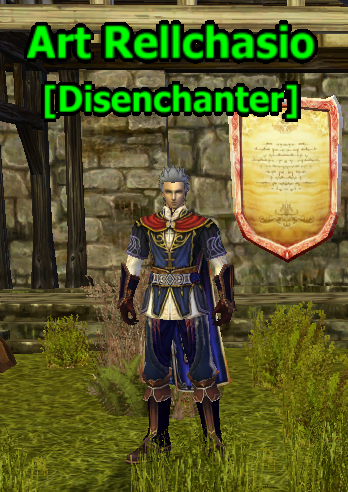
You can find the skill in the Skill book (by default, the K key), in the General tab. It can also be moved to the skill bar. All received monster cards can be enchanted by opening the "Disenchanting" window and right-clicking on the card. The exceptions are the red rarity cards, they are not available for enchanting or any other manipulations.
Depending on the color of the rarity (green, blue, purple, orange) you get the belonging currency from the enchanted card. There are 4 currencies in total:
- Star Soul Stone (Green rarity cards from common monster)
- Etheric Soul Stone (Blue rarity cards from elite monster)
- Astral Soul Stone (Purple rarity cards from boss)
- Elemental Soul Stone (Orange rarity cards from raid boss)
Thus, by enchanting a green rarity card, you will get currency “Star Soul Stone”. The amount of currency received is always random, from 50 to 100 units per enchant, and 50 currency units are fixed for cards received before the introduction of the new system.
Monster Compendium
The Monster Compendium is the main window to see all the important informations about the cards. You will find informations like what cards exist, which cards you own and many more informations you can see below.
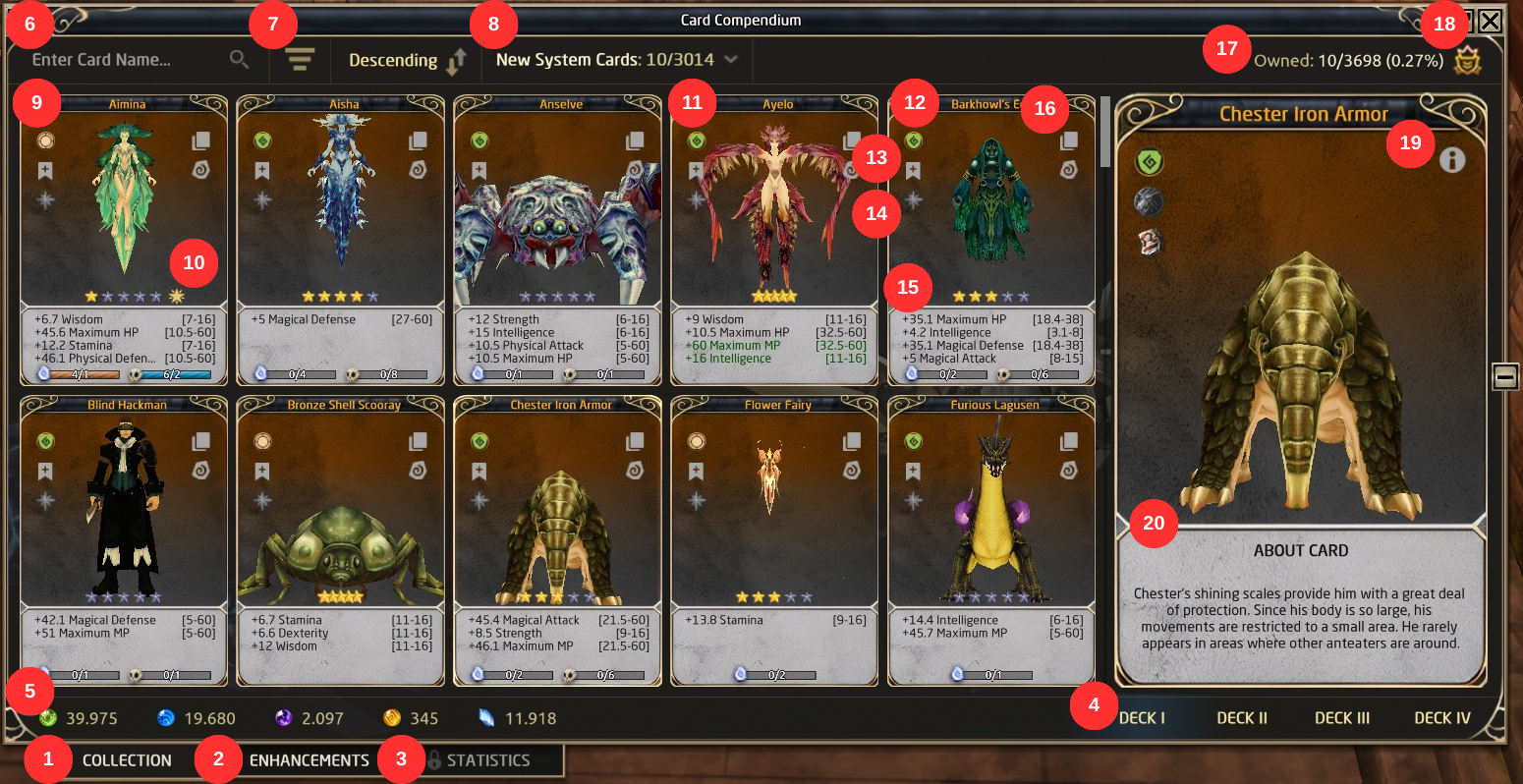
- Collection - shows you all cards
- Enhancements - allows you to upgrade multiple cards from your additional decks simultaneously, as long as they meet the requirements
- Statistics - later
- Decks - swap between your Decks
- List of Currencies - shows amount of currencies which are needed to upgrade cards
- Search Box - search by ID or Monster Name
- Sorting - sort your cards by rarity, attributes, ID or owned in ascending or descending way
- Category Filter - filter for different categories e.g. current zone, festivals, instances, etc.
- Cards - see all your cards, not owned will be grey
- Stars - see the stars, disenchanted cards and monster kills of your card and star up
- Maxed Card - a card that has 5 stars and is automatically added to your other decks
- Card Type - see the type of your card (general, raid boss, physical, magical, defense, boss, unique, old)
- Favorites - save this card as favorite to find it easier
- Boost - pay Diamonds (depend on rarity and number of stars on the Card) to increase all numeric attributes values to maximum (only use if you already have the right attributes on the card), also shares the Card to the other Decks
- Card Stats - shows you the attributes on the card
- Side Buttons
- Extract Card - extract the card from the monster compendium to e.g. sell it
- Enhance - improve the card with special stones you can buy at Asmial
- Total Cards Owned - shows you the total number of all cards owned
- Card Bonus & Monster Type - see all Card Bonuses for your current Deck, the button below tells you the type of the monster e.g. humanoid, magical creature, etc.
- Information - shows you the zone, worth and ID of the card, also the monster ID
- Card description - shows short story about monster from card
Bulk Card Enchantment
Bulk Card Enchantment is a tool that lets you transfer stats from cards in Deck I to other decks. Beware: Only cards with 5 stars or cards upgraded using Diamonds can be used.
- Open the feature by clicking Enhancements in the Card Compendium.
- In the window that appears, choose the new attributes and select whether to use Diamonds or Card Stones.
- Select cards individually or use the “>” button to select up to 100 cards at once.
- Review the total cost shown at the bottom and confirm to apply the new attributes to the selected cards.
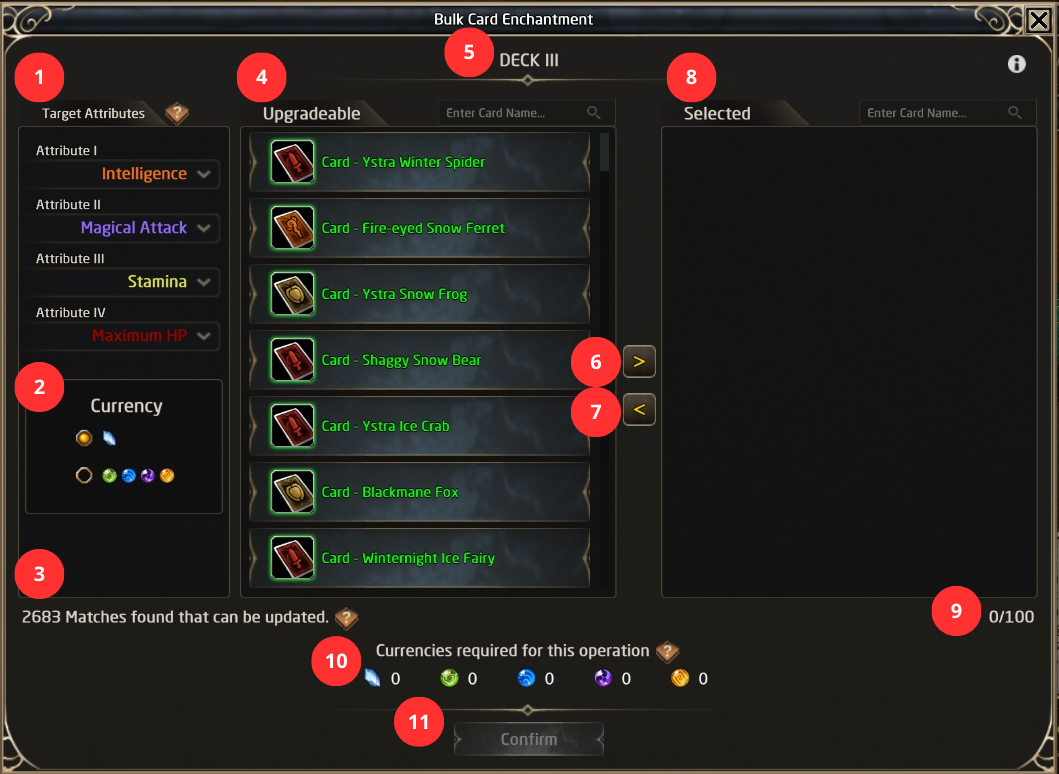
- Target Attributes - here player can select attributes, needed on current Deck
- Currency - selector of currency, player want to pay for process
- Card counter - counting cards, which fill requirements to be upgradable
- Upgradable - list of cards, which can be upgradable
- Deck - show on which deck is player working currently
- Select all - selecting up to 100 cards to be upgradable in one time
- Clear All Selected Cards
- Selected - list of cards, that player selected to upgrade
- Selected cards counter
- Currencies required for operation
- Confirm button
Exchange Old Cards to New Cards
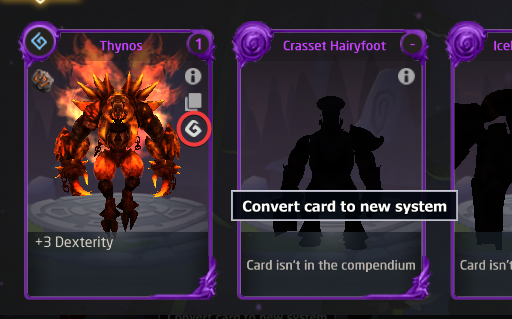
In the new system it is possible to exchange old Cards to new Cards that participate in the New System. To do so, you have to click the following button (red circle):
Types of Cards
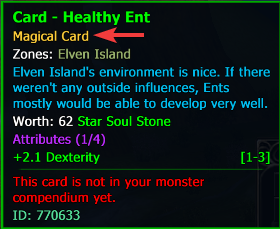
Magical, Physical, Defensive, Universal, General, Ancient - a certain set of card types that have different characteristics:
- Magical - cards that have a certain set of attributes with high numerical values for magic classes. You can get them by killing common and elite monsters.
- Physical - cards that have a certain set of attributes with high numerical values for physical classes. You can get them by killing common and elite monsters.
- Defensive - cards that have a certain set of attributes with high numerical values for defensive classes. You can get them by killing common and elite monsters.
- Universal - Cards that have all attributes with high numerical values. You can get them by killing regular and raid bosses.
- Ancient - Rare cards, most often have attributes with high numerical values. Attributes and their numerical values cannot be changed with improving stones. You can get them by passing different game events, as well as by killing some monsters.
- General - characterized by the fact that they can be changed with improving stones and all attributes have high numerical values. You can get them in some base locations.
|
Category |
Category |
||||||||||
|---|---|---|---|---|---|---|---|---|---|---|---|
|
WIS |
STA |
HP |
MP |
PDEF |
MDEF |
INT |
MATK |
STR |
DEX |
PATK |
|
|
Magical |
1-3 |
1-3 |
5-8 |
5-8 |
5-8 |
5-8 |
1-8 |
5-15 |
1-3 |
1-3 |
5-8 |
|
Physical |
1-3 |
1-3 |
5-8 |
5-8 |
5-8 |
5-8 |
1-3 |
5-8 |
1-8 |
1-8 |
5-15 |
|
Defensive |
1-8 |
1-8 |
5-15 |
5-15 |
5-15 |
5-15 |
1-3 |
5-8 |
1-3 |
1-3 |
5-8 |
|
Universal |
1-8 |
1-8 |
5-15 |
5-15 |
5-15 |
5-15 |
1-8 |
5-15 |
1-8 |
1-8 |
5-15 |
Chance of Cards
Cards in old system zones are obtained on various old rates. They can be looted easier with % drop rate bonuses. They do include server drop rates.
Cards in new system zones are obtained with following rates. Maximum rate can be obtained with having % drop rate chance bonuses. They do not include server drop rates.
| Type of monster | Base chance |
Maximum chance |
|---|---|---|
| Normal | 1% | 10% |
| Elite | 2% | 20% |
| Boss | 10% | 40% |
| Raid Boss | 25% | 100% |
Card Cost Display
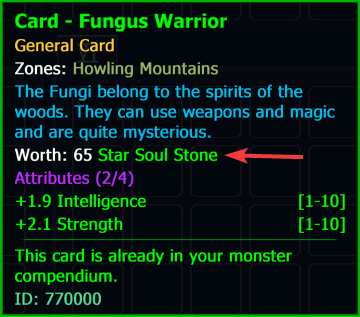
Each card displays the exact amount of currency that will be obtained when disenchanted.
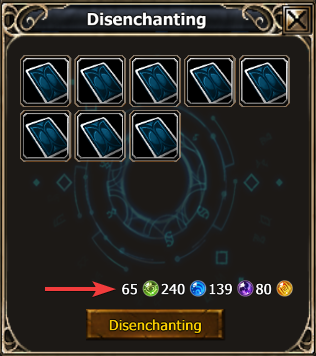
If you use the disenchanting menu, you can see all the currencies and the amount of them that will be obtained when you set the cards for disenchanting. The currencies listed above are required to purchase various gems in the store from the NPC "Asmial". After enchanting the cards, you will get the currency in the form of an item, it can either be sold to other players, or use the right mouse button to add it to the list of currencies.
Be careful, it is impossible to extract the currency after using it!
Number of Attributes
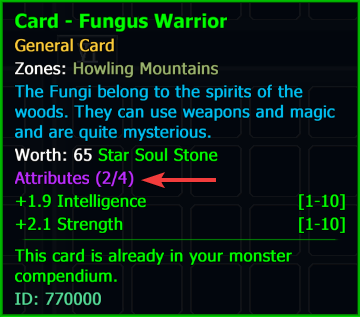
Every card (Magical, Physical, Defensive, Universal, General) can have a maximum of 4 attributes. When killing a monster, by default, a card may have from 1 to 4 attributes with random characteristics. However, if you use special enhancement stones, you can make 4 attributes and improve their numerical values to the maximum values.
Numerical Attribute Values
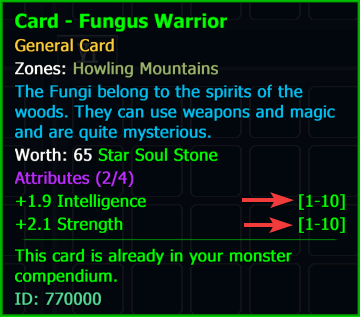
In square brackets you can see what minimum and maximum values the attributes have, that can be achieved. The numerical values are randomly generated when cards are obtained from slain monsters. Also, by using special enhancement stones, maximum values can be reached with high characteristics.
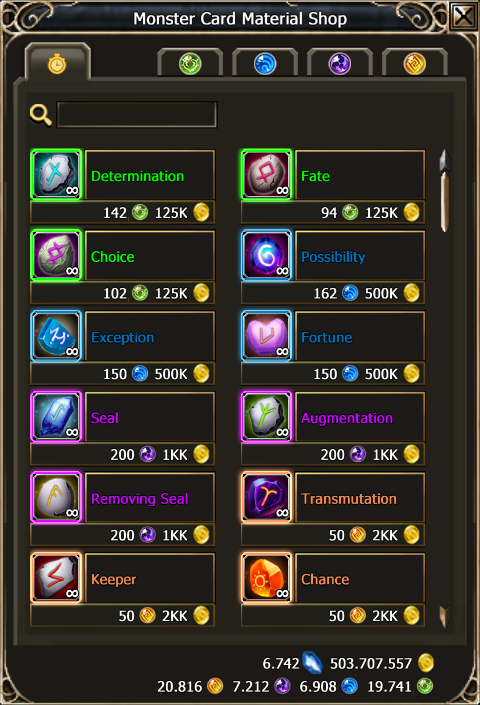
All information on the store screenshot is for informational purposes only. The specified numbers may not be true.
The vendor for improvement stones for the monster cards is named "Asmial" and is located in Atlas City.
There are five tabs in the store:
Free Store - Includes a full assortment of upgrading stones. This store has a system of dynamic prices, the higher the demand for stones in the game, the more expensive they are and vice versa. The Free Store differs from the others in that here the prices are higher, the quantity is unlimited and diamonds are not required.
Star Soul Stone, Etheric Soul Stone, Astral Soul Stone, Elemental Soul Stone - You have to pay a conditional amount of diamonds before using it for the first time. Each tab includes items of different rarity. The prices are low, but the items are limited and when you reach the limit, you have to pay additional diamonds for each purchase or you pay diamonds for a refresh and all the limits in the specified tab will be reset. In these tabs there is no concept of high or low demand, for each character these tabs are individual and do not depend on the actions of other players.
Stardom
The original point of Stardom is that the player can improve each card with stones at a higher chance. It is possible as well to improve cards, including free options. Maximum star value allows also to share card on additional decks. Stardom means that every qualifying card can now have up to 5 stars. You can acquire them by completing special requirements which have different conditions depending on the level of the stars. Each card has 2 requirement types.
Example: If you have the “Card - Fungus” read and you kill “Fungus” 5 times and disenchant such card 3 times, it will open the possibility to “Rise”. “Rise” means that when you fulfill the requirements, you have to upgrade the card to get a new star.
For this process you will have to pay currency you can obtain by disenchanting cards in quests. Or you keep the currency and pay diamonds instead.
Ancient (red color) and other cards that cannot be obtained in large numbers are automatically available on all decks.
Each star also decreases the price for using the Shared Card button by the value of the star.
|
Stars on the cards |
Random Stones |
100% chance stones |
Shared Card |
|---|---|---|---|
|
⭐ |
Chance increased by 2 times |
||
|
⭐⭐ |
Chance increased by 2 times |
Main attributes increase from 0.1 to 0.2 |
|
|
⭐⭐⭐ |
Chance increased by 3 times |
Main attributes increase from 0.1 to 0.2 |
|
|
⭐⭐⭐⭐ |
Chance increased by 3 times |
Main attributes increase from 0.2 to 0.3, and the additional ones from 0.3 to 0.5 |
|
|
⭐⭐⭐⭐⭐ |
Chance increased by 4 times |
Main attributes increase from 0.3 to 0.4, and the additional ones from 0.5 to 0.7. |
Available on any deck |
Shared Cards
You can choose to share a card to all additional decks by not increasing the stars of the card using the Shared button. This will maximise all the current attributes on the card and allow the card to be used automatically in all additional decks. The price for this depends on the rarity and the current star value of the card. Each star level decreases the cost required further.
Changing card attributes on additional decks
As soon as card reaches 5 Stars, it will appear on all decks. Next you must activate the card by setting its attributes, because attributes from the main deck are not transferred to additional decks. The concept of changing attributes is simple and does not directly need enhancement stones. If there are good quality attributes in the main deck "Card - Fungus", then in the additional deck on same card, the player will also be able to choose good quality attributes.
Each attribute on the main card includes a LIMITED selection of attributes that can be made available for selection on additional decks.
An example of good and weak quality attributes:
|
Weak attributes on the main card |
Good attributes on the main card |
|||||
|---|---|---|---|---|---|---|
|
Main Deck "Card - Fungus" |
Additional Deck "Card - Fungus" |
Main Deck "Card - Fungus" |
Additional Deck "Card - Fungus" |
|||
|
HP |
→ |
STR or WIS or MATK |
STA |
→ |
HP or PATK |
|
|
PDEF |
→ |
DEX or INT or PDEF |
STR |
→ |
STA |
|
|
MP |
→ |
MDEF |
DEX |
→ |
STR or WIS or MATK |
|
|
MDEF |
→ |
MP |
PATK |
→ |
PDEF or INT |
|
Attribute selection is a paid process. If the attribute on the main card includes the desired attribute, the cost equal 25 diamonds, otherwise - 250 diamonds. But you don’t have to pay 250 diamonds, you can also change an attribute on the main card with the enhancement stones, so that it has the attribute you want for 25 diamonds.
Numerical values of attributes are preserved, but it is important to consider that if the card is of "Magic" type, then when receiving STA attribute from INT, STA will get maximum numerical value characteristic of "Magic" type. In other words, if INT was 8, the STA will become 3, because the "Magic" type has an STA of maximum 3.
Enhancing Stones
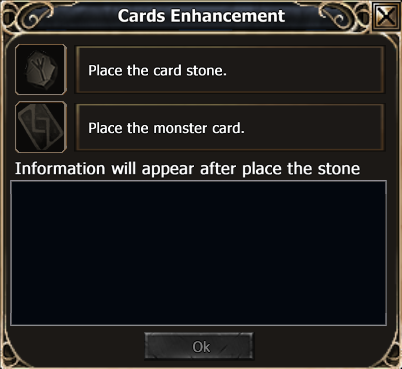
There is a special menu where the cards can be improved. There are two ways to enable this menu:
- Open the compendium and press the special button.
- This method is recommended if you want to improve cards right out of the book.
- Right-click on the special stone.
- This method is recommended if you want to improve the cards you have in your backpack.
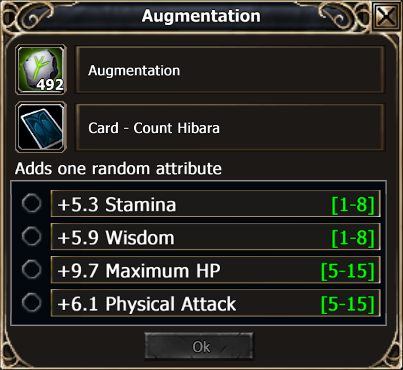
Depending on the set stone, different card manipulations will be suggested. For example, you can do the following:
- Randomly change the number of attributes on the card.
- Add a random attribute.
- Change a random attribute to any other attribute.
- Change a specific attribute to any random attribute.
- Change a specific attribute to another specific attribute.
- Remove a random attribute.
- Delete a specific attribute.
- Add a specific attribute.
- Change the numeric value of a random attribute.
- Changes the numeric value of a specific attribute.
- Blocks a random attribute. Maximum of 2.
- Removes the random attribute lock.
- Completely blocks / unlocks the card from accidental changes.
- Randomly changes the numeric values of the attributes.
- Increases the numerical values of the main attributes by +0.1 and additional attributes by +0.3.
Full list of stones and detailed description
In total, there are 11 new parameters that can be obtained on the card:
- Strength.
- Stamina.
- Intelligence.
- Wisdom.
- Dexterity.
- Max HP.
- Max MP.
- Physical attack.
- Magical attack.
- Physical defense.
- Magical defense.
It is important to remember that it is impossible to get 2 identical parameters on the card, and when working with stones.