











Crash Report Révisions de Taborea: 4 août 2024
There are three different types of “disconnection” and they all have different reasons on why are they happening.
Crash Report
When it happens, a window appears in the middle of the screen.
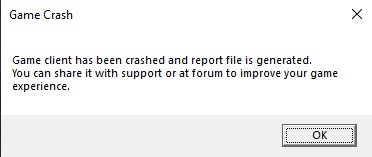
Normally, the game stays open and inaccessible while this window is open in the screen. Automatically, it generates a file with information and the game itself upload it to our system. If this crash report happens often, you can write a ticket to support and they will help you to find out where the problem is. Important to add in the ticket the exact time when this crash happened. The possible causes are handled engine or UI error. They are mostly fixable.
Game Close
The game completely closes alone. There is no window (like in crash report). It is an unhandled game crash. You can write a ticket to support but they require all the possible information in order to being able to reproduce the error to fix it.
The required information could include:
- Name of character used.
- Exact time.
- Zone.
- What were you doing (in a fight, quest, clicking something, etc.). Add the name of the monster, the quest… Always try to use IDs so is easier for us.
- Settings: such as video settings, audio settings, interface settings, etc.
- Addons: a screenshot of all the addons in your game folder.
- Integrity Report in launcher.
Disconnect
The game remains open. Inside the game you can see that the “ping” (MS) is going up and your character is not responding to your actions.
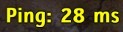
Eventually you will be sent back to the character selection. This is normally the case when the internet connection is lost. A micro cut of the internet can be enough for this. It could be your Internet provider or your own connection.
If you can’t reconnect:
- Try with other websites or programs (if is also not working, then is your internet)
- Retry in a few minutes.
- Restart your router.
- If none of these options work, you can always write a ticket to support or ask for help in discord or forum.
Note: if this happens often, be sure to contact support and they will try to help.